Sagnotch
Your MacBook notch, turned into a Dynamic Island.
Sagnotch makes the camera notch useful. It glides open when your cursor approaches and collapses when it leaves, with native Dynamic-Island motion. One modular surface — now-playing media with album-art colors and lyrics, system stats, calendar and reminders, timers, a file shelf, clipboard, battery, and a Control Center — right where you already look.
v1.41.0 · 7.9 MB · macOS 14 Sonoma+ · Apple Silicon
SHA-256 684a071c786ea42124aac30cd7042796ac0337b5e8abf3281b165edcb591ca7a
Try every feature free for 14 days. Buy a license in the app whenever you're ready.
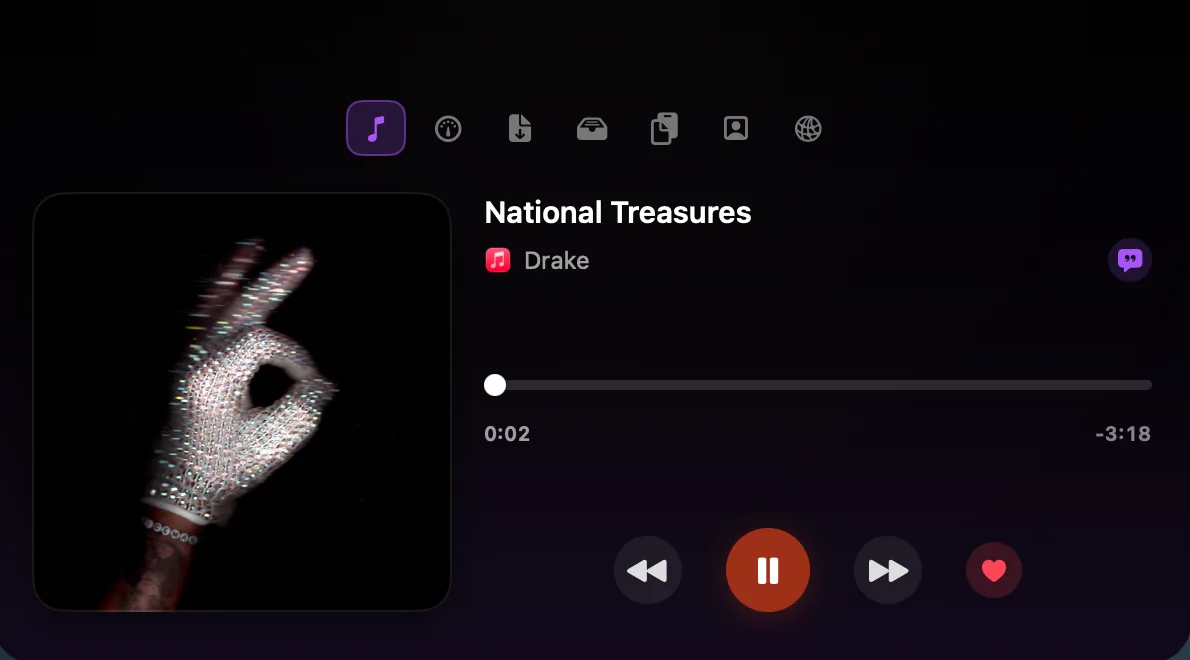
Eight modules, one notch — media, system stats, calendar and reminders, timers, a file shelf, clipboard, battery, and a Control Center. Try a few of them right here.
Free trial · 7.9 MB · macOS 14 Sonoma+
/ What it does
- MediaNow playing from Apple Music, Spotify, or any browser — artwork, scrubber, lyrics, album-art ambient colors, and love/favorite. A live peek flanks the notch while music plays.
- StatsLive CPU, GPU, RAM, and more in the notch — Statty's system monitoring, built in.
- Calendar & RemindersYour next events and to-dos at a glance, with quick add and one-tap join for meeting links.
- TimersStart and watch countdown timers straight from the notch.
- Drop & ShelfA drag-and-drop tray for files in transit, plus a shelf that keeps the ones you want around.
- ClipboardClipboard history with pinning, summoned by a global hotkey.
- BatteryCharge level, time remaining, and status — glanceable beside the notch.
- Control CenterWi-Fi, Bluetooth, Focus and more — toggles right in the drawer.
/ Highlights
- Eight modules in one notch — switch them from the top icon bar; the active one fills the drawer.
- Now-playing pulls album-art ambient colors and synced lyrics, and you can love a track right there.
- Opens on cursor approach, collapses when you leave — pixel-matched to the real notch, native Dynamic-Island motion.
- A live-activity peek (artwork + waveform) sits beside the closed notch while music plays.
- No notch? A floating panel takes its place. Lives in the menu bar, off your Dock, above every Space.
/ Pricing
Free trial
- Every feature, 14 days
- No card required
- Add a license anytime to keep going
The download is free; the 14-day trial unlocks everything. A license is entered in the app — buy once, no account needed on this site.
Frequently asked
How does the 14-day trial work?
Download the app and use every module free for 14 days — no account, no card. When the trial ends, Sagnotch asks for a license key.
How do I activate my license?
After checkout your license key arrives by email. Open Sagnotch → Settings → License and paste it. Activation needs internet once; afterwards the license verifies offline.
Lifetime or Monthly — what's the difference?
Lifetime is a one-time purchase and includes all future updates. Monthly is a small subscription you can cancel anytime; the app stays unlocked while it's active.
Can I move my license to a new Mac?
Yes — the license is bound to your Mac at activation. Switching machines? Write to halid@saglitz.com and the binding is reset.
Does my data leave my Mac?
No. Clipboard, shelf and reminders stay on your Mac (with optional iCloud sync via your own account). Only license checks talk to a server.
/ Install & run
- 1Download and open the Sagnotch .dmg.
- 2Drag Sagnotch into your Applications folder.
- 3Launch it from Launchpad — it lives in the menu bar (no Dock icon).
- 4Move your cursor up to the notch and the drawer glides open.
Signed with a Developer ID certificate and notarized by Apple, so it opens with a normal double-click — no right-click workaround, no security warning to click past.
/ Requirements
- macOS
- macOS 14 Sonoma or later
- Chip
- Apple Silicon
- Version
- v1.41.0
- Download size
- 7.9 MB
/ Privacy
- No accounts, no analytics, no telemetry — nothing leaves your Mac.
- Reads now-playing through the system, so it covers any app without extra setup.
- Asks only for what a module needs — Calendar access for the Calendar module — and nothing more.